 Heardly
Запись звонка без ботаRecording a call, no bot
Heardly слышит и вас, и собеседников: ваш голос берёт с микрофона, их — из звука приложения, в котором идёт разговор. В саму встречу никто не подключается.Heardly hears both sides: your voice from the microphone, theirs from the audio of whichever app the conversation runs in. Nothing joins the meeting itself.
Как начатьGetting started
-
Откройте попап HeardlyOpen the Heardly panel
Щелчок по значку в строке меню.
Click the icon in the menu bar.
-
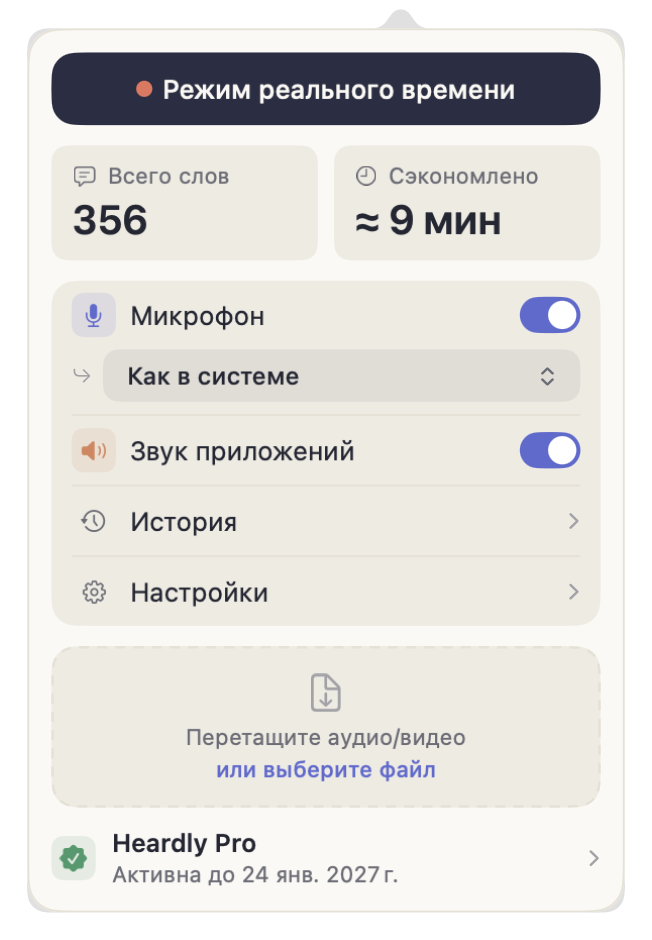
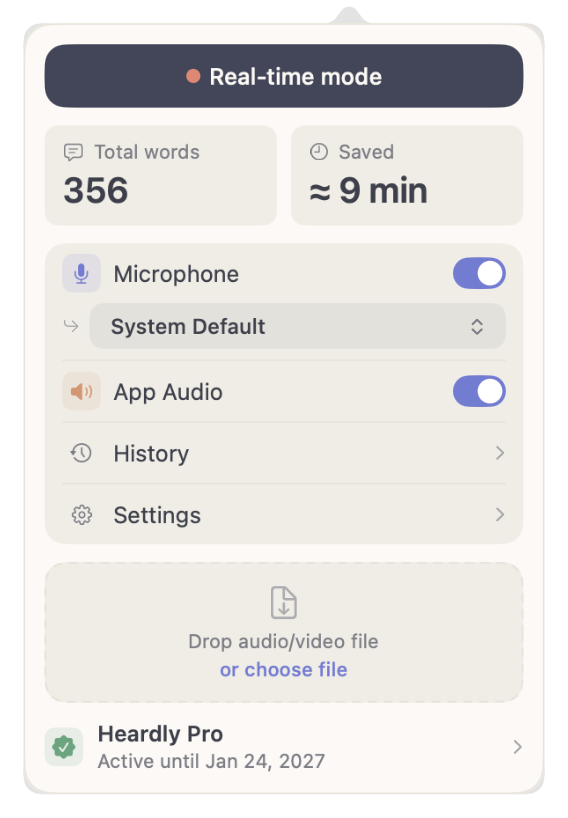
Проверьте источникиCheck the sources
«Микрофон» — ваш голос, «Звук приложений» — всё, что звучит из программ. Для встречи нужны оба.
“Microphone” is your voice, “App Audio” is everything coming out of apps. A meeting needs both.
-
Нажмите «Режим реального времени»Press “Real-time mode”
Откроется окно живой расшифровки, и текст начнёт появляться по ходу разговора.
The live window opens and text starts appearing as the conversation goes on.
-
В конце нажмите «Стоп»Press “Stop” at the end
Запись сохранится в Историю, в раздел «Звонки и встречи».
The recording is saved to History, in the “Calls and meetings” section.
Кто есть кто в расшифровкеWho is who in the transcript
Heardly различает два источника и подписывает реплики: «Я» — то, что пришло с микрофона, «Компьютер» — то, что звучало из приложений. Это не распознавание говорящих по голосу: если в переговорной за одним микрофоном сидят трое, все трое будут подписаны как «Я».
Heardly tells the two sources apart and labels the lines: “Me” for what came from the microphone, “Computer” for what played out of apps. This is not speaker recognition by voice: if three people share one microphone in a meeting room, all three are labelled “Me”.
С какими приложениями работаетWhich apps it works with
С любыми. Heardly берёт звук на уровне системы, поэтому ему всё равно, идёт звонок в Zoom, Google Meet, Telegram, Discord или в браузере. По той же причине он расшифрует и видео на YouTube, и голосовое сообщение.
All of them. Heardly takes the audio at system level, so it does not care whether the call runs in Zoom, Google Meet, Telegram, Discord or a browser tab. For the same reason it will transcribe a YouTube video or a voice message just as happily.
Бота в звонке не видно, а значит, никто не узнает о записи сам. Во многих странах и компаниях запись разговора без предупреждения недопустима — скажите об этом вслух в начале встречи.There is no bot to see, so nobody learns about the recording on their own. In many countries and companies recording a conversation without telling people is not acceptable — say it out loud at the start of the meeting.